Conditions are the rules that determine when the State Machine transitions from one state to another. Transition Condition Scripts let you define custom conditions when built-in comparisons aren’t enough—such as transitions that depend on complex logic or multiple view model properties evaluated together.

Creating a Transition Condition Script

Create a new script and select Transition Condition as the type.

Anatomy of a Transition Condition

type MyTransitionCondition = {
  context: Context,
}

-- Called once when the script initializes.
function init(self: MyTransitionCondition, context: Context): boolean
  -- Context gives you access to your main view model and other data.
  self.context = context

  return true
end

-- Add your transition logic here.
-- `evaluate` is fired every frame while the transition is active.
-- Returning false prevents a transition, true allows a transition.
function evaluate(self: MyTransitionCondition): boolean
  return false
end

-- Return a factory function that Rive uses to build the Transition Condition instance.
return function(): TransitionCondition<MyTransitionCondition>
  return {
    init = init,
    evaluate = evaluate,
    context = late(),
  }
end
evaluate runs every frame while the transition is active.It should be fast and side-effect free, and only return whether the transition is allowed.

Adding your Transition Condition

1

Select a Transition

2

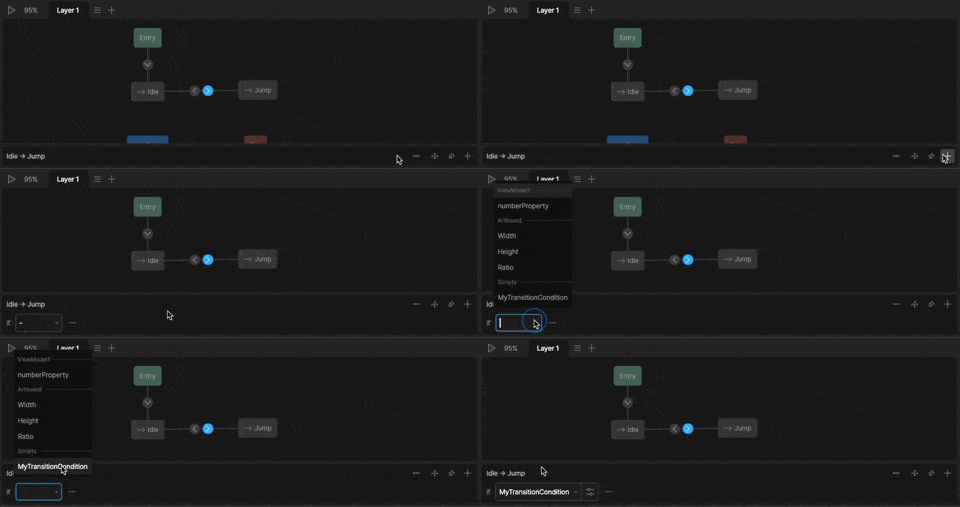
Click + to add a new Condition

3

Select your Script

Add a custom transition

Script Inputs

Inputs let you parameterize a transition without changing script logic—making the same condition reusable across different transitions or states. For more information on adding inputs to your scripts, see Script Inputs.
Inputs can control scripts, but scripts can’t change the value of inputs.If you need to control a view model property from your script, access the Main View model through context or View Model Inputs.

Setting an Input

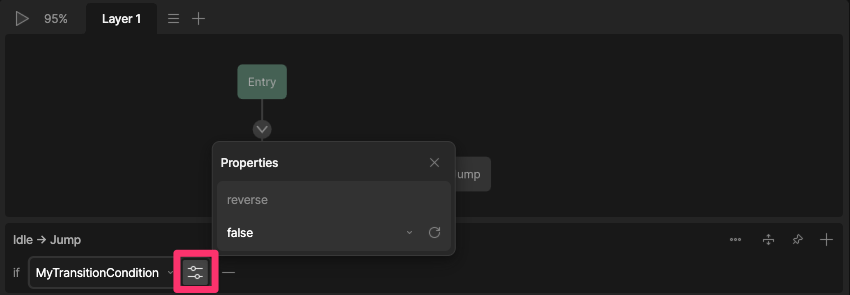
To set the value of an input, select the Properties icon next to the transition. transition script inputs
Data Binding an Input

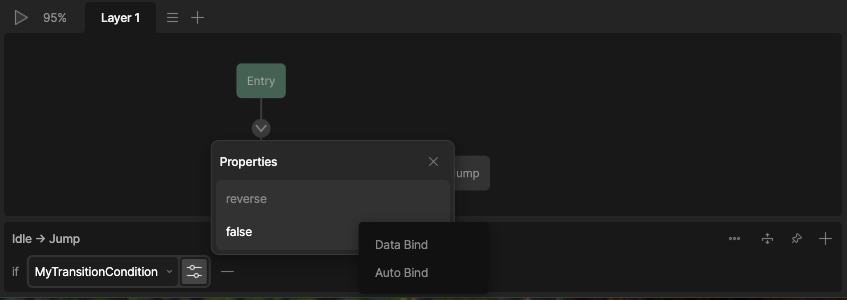
Right-click your property and select Data Bind to bind your input to a view model property. data binding transition script inputs